Getting started
Install the app, understand what it asks of you, and record your first day — about five minutes, with no account to create.
What Kidney Daily does
Welcome to Kidney Daily. This page covers what the app is for, what it deliberately leaves alone, and how to record your first day. There is no account to create and nothing to configure before you start.
The app is a notebook, not an adviser. It is built around one loop: you write down what happened, you see it back plainly, and you take it with you to your next appointment.
- Write down what happened — a meal, a glass of water, a medication check-in, a blood-pressure reading, or a question you want to ask.
- See it back plainly — your own entries, by day, with nothing scored or colour-coded as good or bad.
- Take it with you — generate a local Doctor Export PDF before an appointment, when you choose to.
Kidney Daily does not diagnose, treat, interpret laboratory results, or decide what food or fluid is right for you. Always follow the instructions your own care team gave you.
Installing and opening it
Kidney Daily is published on Google Play for Android. There is no iPhone version. When you first open the app it goes straight to today — no sign-up screen, no email, and no onboarding questionnaire.
Because everything is stored on the device, the app works with no connection at all. That also means nothing is recoverable from a server if the phone is lost or replaced, which is worth knowing before you rely on it as your only record.
The home screen at a glance
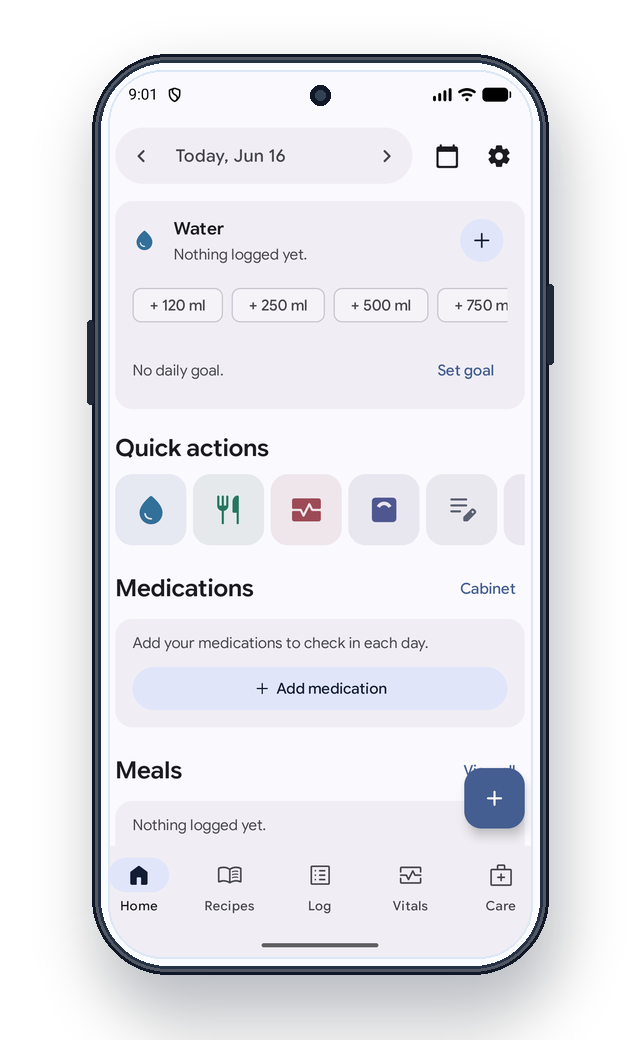
The app opens on today. Everything you record lives on this one screen, in roughly the order most people use it.
- Date bar
- Move back and forward a day at a time, or jump to a date with the calendar button.
- Water
- Quick-add buttons for common amounts, and an optional daily goal that you set yourself.
- Quick actions
- One tap to water, a meal, vitals, weight, or a note.
- Medications
- Your own list, checked in each day. The app never suggests a medicine or a dose.
- Meals
- What you ate, with saved foods for the things you have often.
- Bottom bar
- Home, Recipes, Log, Vitals, and Care.
Your first day
You do not need to fill everything in. One entry is a complete first day.
- Tap a water amount. That is your first entry recorded.
- Add the medications you already take, once. After that it is a daily check-in rather than a form.
- Write down one question you want to ask at your next appointment.
- Set one reminder, for whichever of these you are most likely to forget.
A day you did not log is just a day you did not log. There is nothing to break, and nothing turns red.